Modernizing the Seat Selection Experience
Improving clarity, quality and trust for guests selecting seats across booking, self-serve, and check-in.
Overview
Complex business rules made it difficult for guests to understand what their seat selection included.
I led the end-to-end redesign: framing the problem with product, setting the design direction, directing a second designer, and driving decisions through research and delivery.
The first features have shipped, and the rest are in build. Guests rated the redesign 4.49 out of 5 for ease, and the first A/B test produced a 1.7% relative lift in paid seat attachment, projected at about $1.5M a year.
The problem
The trust gap in seat selection
As WestJet introduced new fare tiers and bundle rules, seat selection became a high-friction decision. Guests struggled to evaluate seat value, facing unexplained price variations, unexpected physical constraints, and complex fare rules tied to baggage allowances.
Bridging this trust gap was further complicated by system fragmentation: seat selection was split across two separate codebases for booking and check-in. Every attempt to clarify rules or surface contextual details required duplicate design and development effort across both platforms.
Framing the work
Turning competing asks into one direction
Revenue, marketing, operations and product each arrived with their own goals. Rather than designing for each one, I paired every goal with the guest friction standing in its way, so the whole team was solving the same problem.
How might we make a seat’s value clearer, instead of pushing harder?
How might guests understand exactly what they’re buying, drawbacks included, at the moment they decide?
How might marketing get a flexible, testable slot without burying the seat map?
Prototyping to decide
Building quickly instead of perfectly
Instead of debating a feature wishlist and spending weeks deciding functionality, I used AI to build multiple clickable seat map prototypes in Figma Make. The prototypes opened up far more ideas and helped us align quickly with our stakeholders. Every feature had to tie back to a business objective to make the cut, and the rest were parked rather than dropped.
Now
Focused effort
- Simplified seat legend
- Refreshed seat map
- Seat preview earlier in booking
- Transparent price breakdown
- Improved wayfinding
Mobile-first design to address our growing mobile audience.
Later
Parked, not abandoned
- Seat filters
- Recommended seats
- Promo codes
- Voucher redemption
- Seat bundles
Some wait on API work; others are bigger than seat selection alone.
The design
Improving seat comprehension
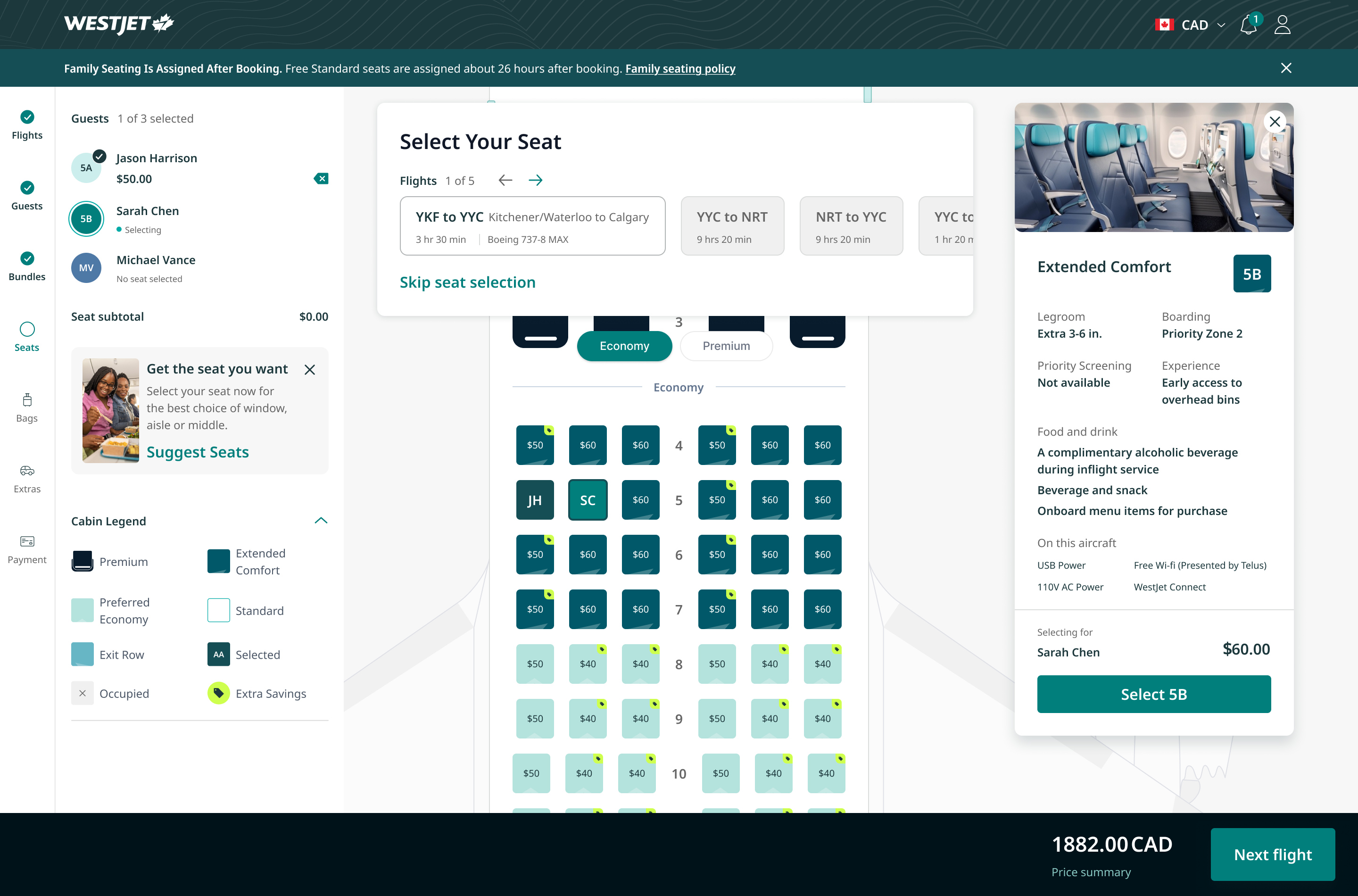
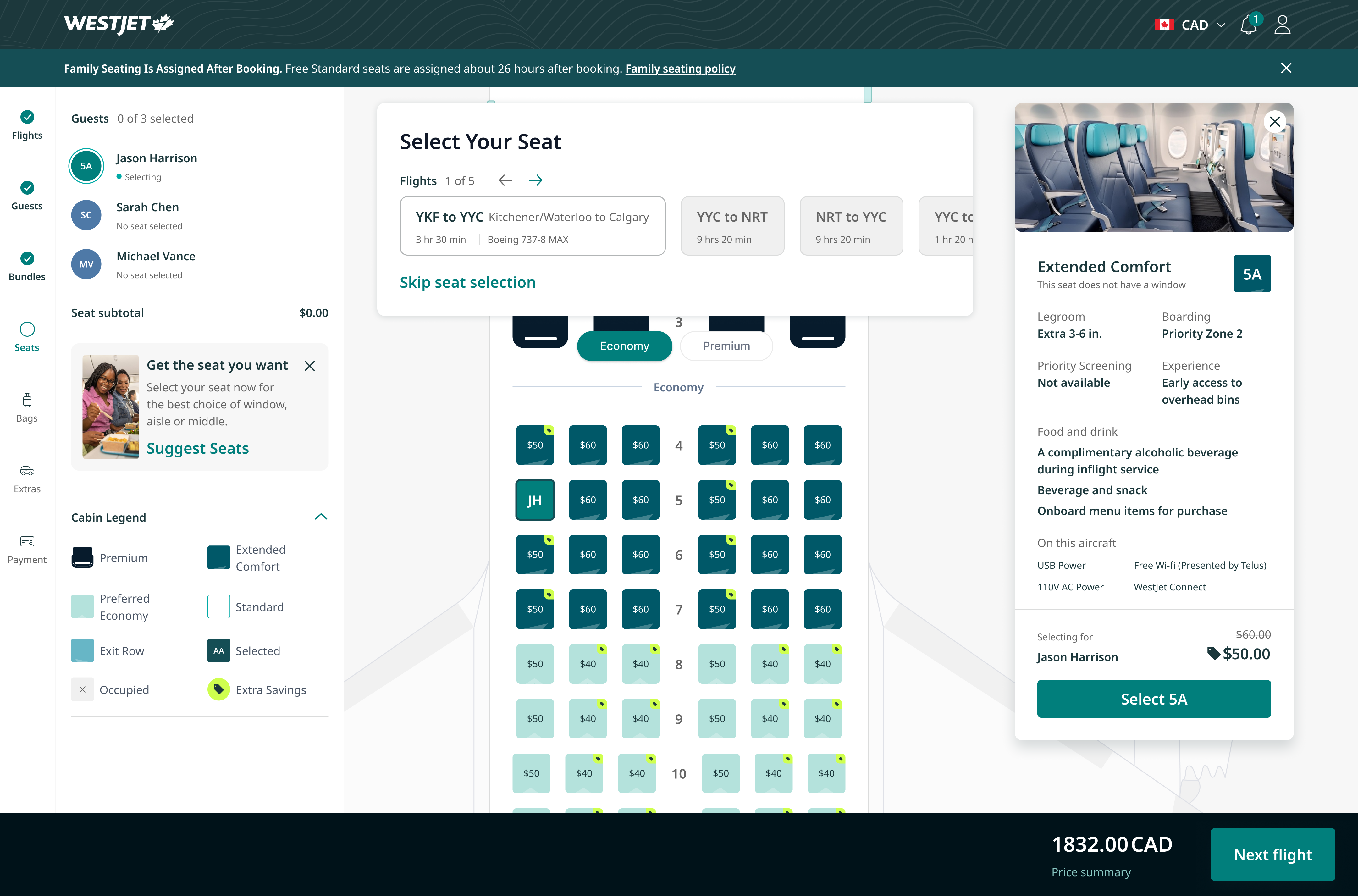
The design team focused on two goals: simplifying the experience and building trust. We reduced friction by removing, improving, or relocating all the content, including pop-ups. This ensured all messaging was contextual and would help the guest understand their travel experience. We also created new features to streamline the experience by letting guests quickly add seats for all their flights.
Providing context
Making it easy for guests to understand and improve their travel experience.
- Onboard considerationsSurfaces guest-specific service requests and operational accommodations (e.g., SSRs, accessibility needs, pets, seating requirements) that may impact the travel experience or require airline handling.
- Quick actionA consistent and scalable design for the auto-assign seat feature. Guests can easily select seats, and stakeholders get a slot to market their offerings.
- Aircraft information Displays the aircraft type and flight duration front and center. Flight duration is one of the top factors in how guests choose a seat.
- Seat considerationsBuilds trust by calling out seats that have unique or undesirable attributes like no window or fixed recline.
- Seat attributesDistinguishes each seat type's features instead of a generic list, and shows how the seat changes the guest's airport experience.
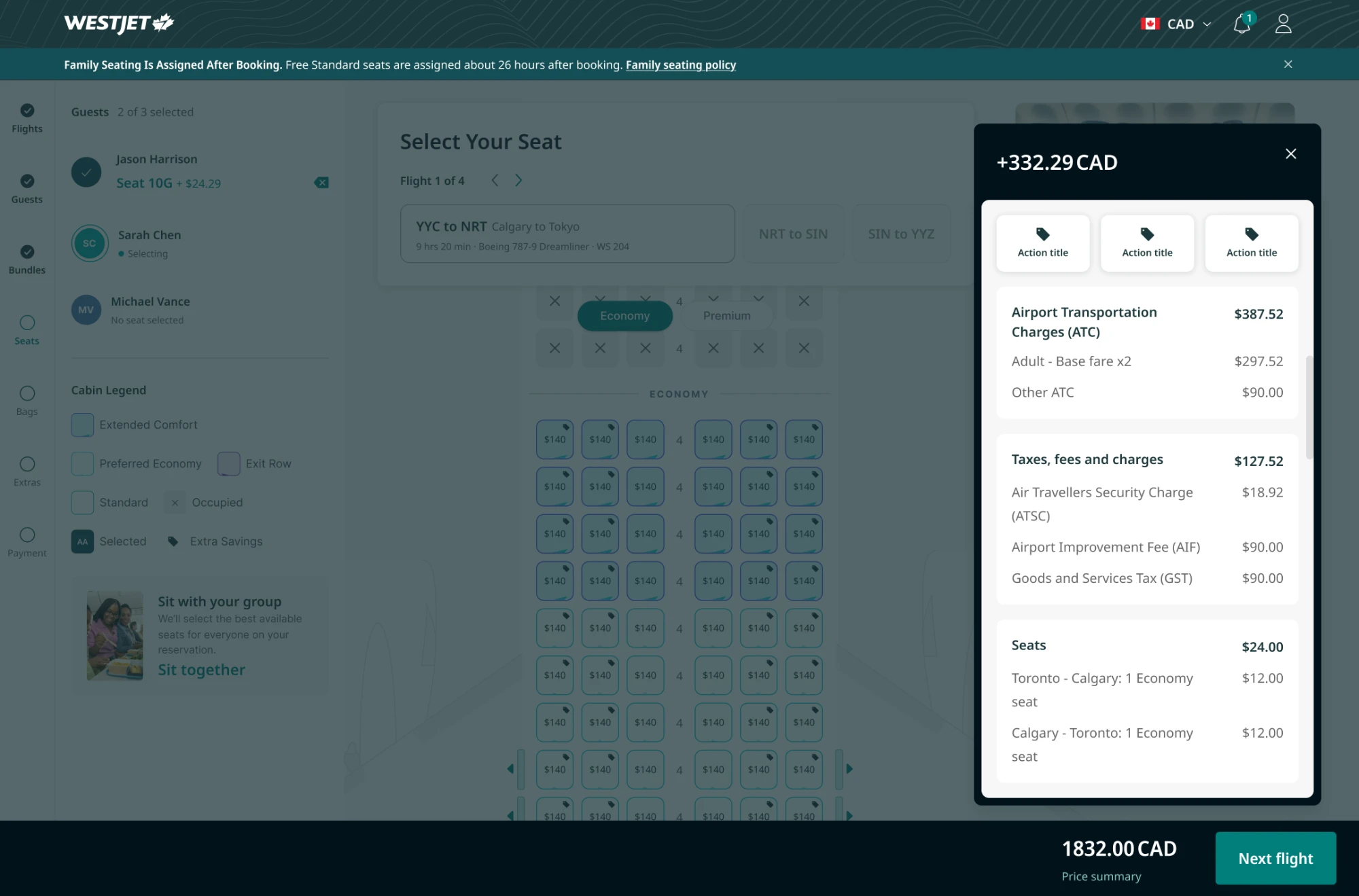
- Shopping cartA new, sticky shopping cart that improves visibility of the total price. The redesigned price summary clearly breaks down the price into digestible sections.
Design system improvements
The seat selection page had not been designed holistically in 7 years. I took this opportunity to update all styling to match our Arrival design system. I contributed many new components to the library, as well as creating our motion design guidelines using tokens.
Selecting Sarah Chen Calgary to Tokyo (9 hrs 20 min)
Flight 1 of 4
Skip seat selection
Jason Harrison$24.99
Sarah ChenSelecting
Michael VanceNo seat selected
Motion · Pulse
- Opacity
- 55% → 100%
- Duration
duration/pulse1000ms- Easing
easing/pulse0.45, 0, 0.55, 1- Loop
- Trough → peak, infinite
Selecting forSarah Chen
$59.26$49.26
- Legroom
- Extra 3-4 in.
- Boarding
- Priority Zone 2
- Priority Screening
- Not available
- Experience
- Early access to overhead bins
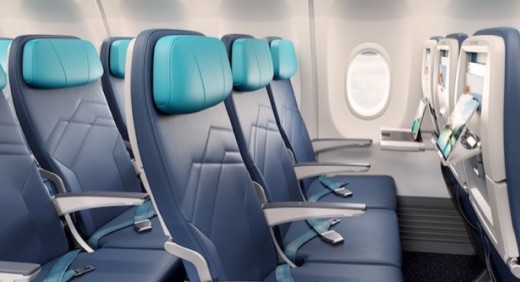
Food and drinkA complimentary alcoholic beverage during inflight service
On this aircraftUSB power · Free Wi-Fi · 110V AC power
Airport Transportation Charges$387.52
Adult - Base fare x2$297.52
Other ATC$90.00
Taxes, fees and charges$127.52
Airport Improvement Fee (AIF)$90.00
Goods and Services Tax (GST)$37.52
Seats$24.00
Calgary - Tokyo: 2 Economy seats$24.00
Min 375
- Guest list: Who’s selecting, their flight and every guest’s seat in one place. The active guest pulses between 55% and 100% opacity every second, a looping motion that reads as live without a one-shot animation.
- Seat details panelSeven named parts, from the seat type header to the image container, so booking, self-serve and check-in build the same panel.
- Price details: A fixed header and total over flexible slots. Action, message and pricing slots let each product fill the panel without a new component.
- Global header: The logo and a row of slots for currency, notifications and profile, down to a 375px minimum on mobile.
Mobile friendly
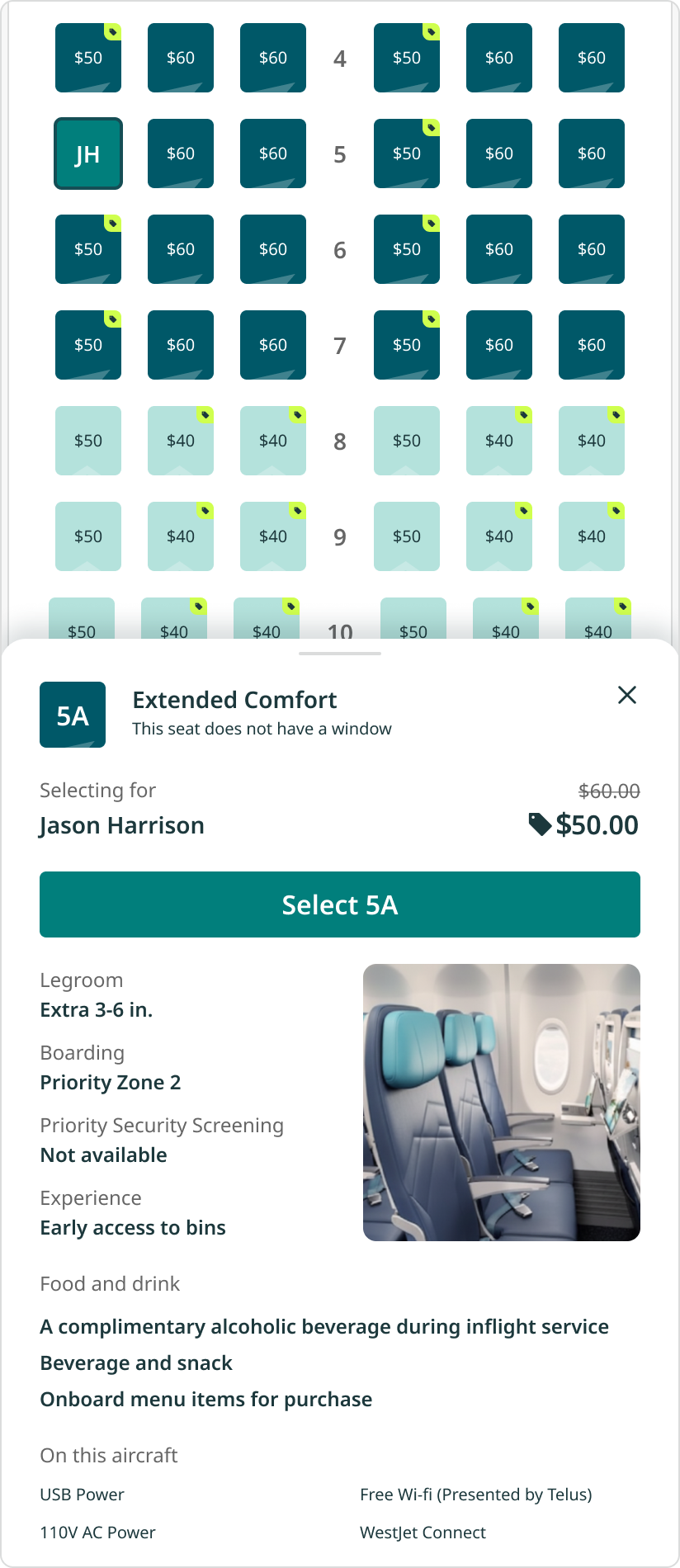
A top priority was reducing the scroll length before guests saw the seat map. We designed the seat map from a mobile-first perspective, focusing on ease of use.
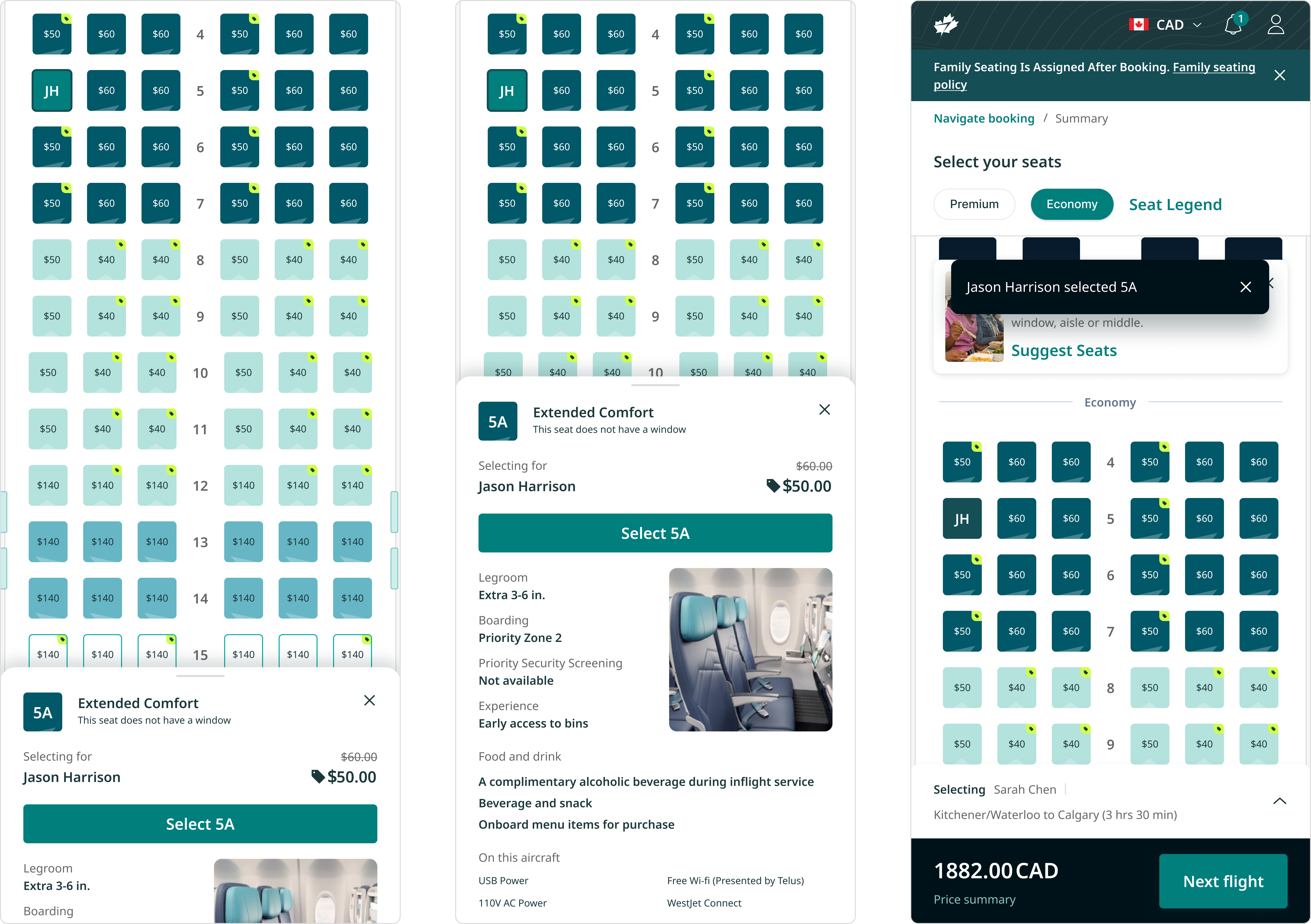
- Map stays visible The seat details panel shows legroom and price, the key decision factors for guests.
- Expanded details panel Guests who want more can scroll up to see every detail about the seat.
- Established mobile patterns Familiar patterns like toasts tell guests what just happened, such as which seat they selected.
Balancing detail and simplicity
We had to show the value of a seat and keep every detail accurate, while still making guests want to buy one.
We created the seat details panel to house detailed seat information. This way, we could clearly show our guests what each seat included and what they should expect for their airport and in-flight experience. We standardized all the attributes so it would be easy to compare, and arranged them in order of what guests care about most.
More detail also means more clutter. Other teams needed their information represented too, which made the sheet longer. On mobile, guests see the key information first and can expand the sheet for every detail.
Test and learn
Proving it before launch
Our research team ran multiple studies, including competitive research, comprehension, and usability testing with my prototypes.
4.49/ 5rating for ease
Is it easier?
Guests called it cleaner, with every traveller and the running total in one place. 57% had no difficulties at all, and 60% picked it over two alternatives.
While we gathered qualitative user data, we also ran A/B tests with the optimization team to get quantitative data.
+1.7%relative lift in paid seat attachment in a 26‑day A/B test
Does one message beat three?
The pop-up warning guests that they hadn’t picked a seat listed three benefits at once. I bet one focused reason would be easier to act on, and I worked with the optimization team to run three variants against the original.
The winning message now shows for every guest, projected at $1.5M a year.
Leading the work
Raising the bar beyond my own files
I set the direction for each component with our junior designer, gave feedback on her explorations, like the seat colours and a simpler mobile bottom bar, and reviewed the work before it reached development.
I ran a weekly seats review with product, development, marketing and research: design updates, open questions and decisions, each logged with its date so it stayed closed.
Everything going out for seats was reviewed with the product owner and developers first. I also worked with QA to audit the designs being released.
I proposed handing off desktop and mobile specs instead of four breakpoints to speed up delivery, and confirmed with development that two were enough.
Impact and takeaways
The first phase has launched and will be seen by millions of guests a month. We will keep monitoring the page's performance and optimizing the design.
Speed depends on alignment
Clickable prototypes in the first three weeks meant stakeholders debated real interactions, not imagined ones, so the team moved fast without re-litigating scope.